Pricing
Summarize pricing-page feedback from the last 30 days
Ask an agent to find recent pricing concerns, group repeated objections, and suggest the next pricing-page experiment.
Bring feedback collected in Signaldeck into your AI conversations through MCP. Explore pricing objections, onboarding problems, and feature requests without copying responses between tools.
Read-only access to your Signaldeck responses and available summaries.
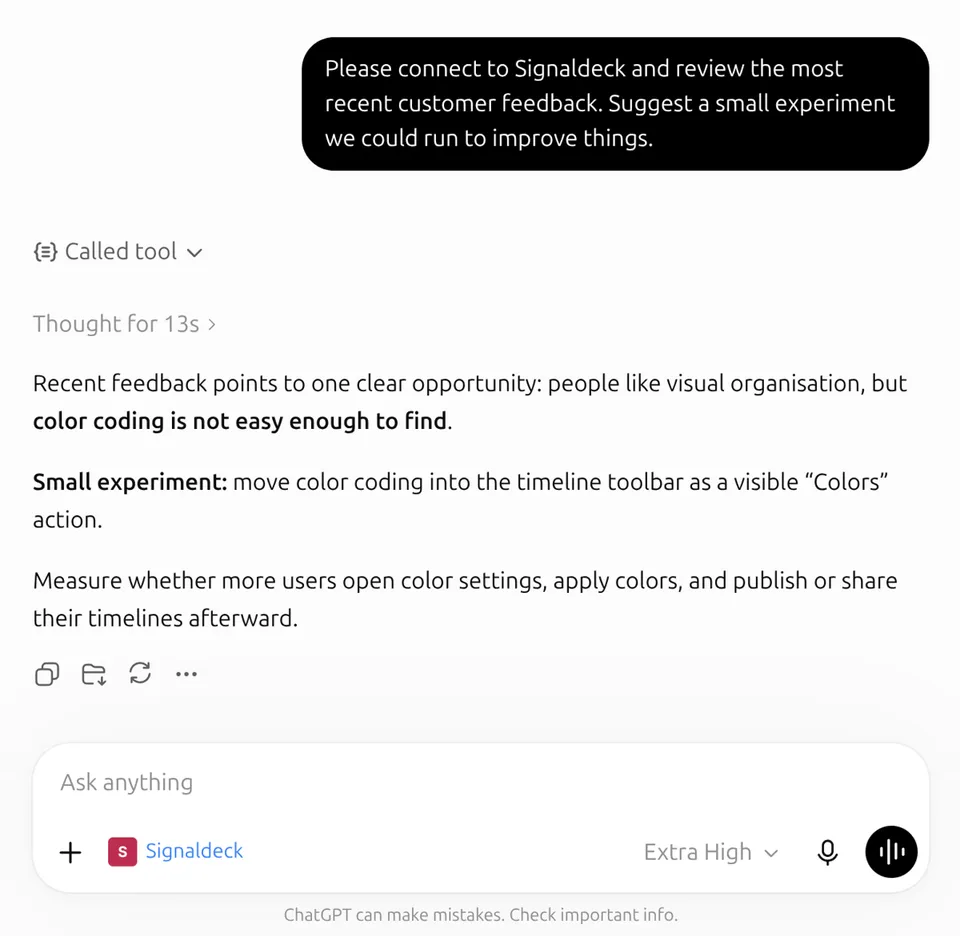
In practice
A customer feedback MCP server is a Model Context Protocol endpoint that lets an AI tool retrieve feedback context from a product system. Signaldeck's server exposes supported, account-scoped retrieval tools for feedback already collected in Signaldeck.
Ask ChatGPT, Claude, or another MCP-compatible tool what users said about pricing, onboarding, reported issues, churn reasons, feature requests, or the latest submissions.
Collect customer feedback with the widget to give your AI tools a source of customer responses.
Example workflows
Give agents customer evidence before they write, plan, or route work. Build an AI-native improvement loop from feedback to issue draft, roadmap note, weekly readout, or product decision.
Pricing
Ask an agent to find recent pricing concerns, group repeated objections, and suggest the next pricing-page experiment.
Retention
Pull in churn and cancellation feedback before you simplify the flow, test retention prompts, or change the questions in the cancellation experience.
Issue tracker
Turn repeated feedback into a well-sourced issue draft. Signaldeck supplies the customer context; your agent can create the issue.
Claude Code
Bring customer context into the coding session so implementation choices reflect what users actually struggled with.
Weekly readout
Use summaries and response search to brief the team on emerging themes, risks, positive signals, and decisions that need an owner.
Signaldeck's MCP tools let agents find the right project, inspect forms and submissions, search response text, and read current summaries through one consistent feedback source.
projects.list
List the Signaldeck projects the connected account can read.
forms.list
Find the forms tied to a product area, page, workflow, or research question.
submissions.list
Pull recent feedback for a project or form, with date filters when the agent needs a specific window.
submissions.get
Inspect the source response behind a theme, issue, or summary before acting on it.
responses.search
Find responses that match a phrase, product area, objection, bug report, or customer question.
insights.summary
Start from an available Signaldeck readout before drafting a roadmap note, experiment, or team update.
Add Signaldeck’s remote server to an MCP-compatible client, sign in and authorize the right account, then ask the client to retrieve relevant feedback. Access is read-only and account-scoped, with access tokens that expire after 90 days.
Connect the Signaldeck MCP server using the server URL, OAuth instructions, and tool reference in the setup guide.
Use this server URL in your MCP-compatible client.
Signaldeck gives agents a consistent source for customer evidence through projects, forms, submissions, response search, and available summaries, all connected to feedback collected inside Signaldeck.
A customer feedback MCP server is a Model Context Protocol endpoint that lets AI tools retrieve feedback context from a product system. Signaldeck's MCP server lets agents access feedback collected on your own site through the Signaldeck feedback widget, including submissions, response search results, and summaries.
Yes. Signaldeck can be set up as a ChatGPT app by creating a connector for the Signaldeck MCP server, then choosing the app from the tools menu in a ChatGPT conversation.
Yes. In Claude, add Signaldeck as a custom connector for the remote MCP server. In Claude Code, add the Signaldeck MCP server as a remote HTTP server and complete the sign-in flow when Claude asks for it.
Connected tools can use supported read tools for projects, forms, submissions, response search, and Signaldeck summaries that the connected account can access.
No. The MCP tools retrieve feedback context for analysis. They do not modify your projects, feedback widget, collected feedback, or summaries.
After an MCP client starts the connection, Signaldeck asks the user to sign in and authorize MCP access. The client receives a time-limited OAuth token for the read scope and can call the supported MCP tools until the token expires.
Copying feedback into a chat gives the model a static bundle of raw customer text. MCP lets a connected tool retrieve scoped Signaldeck context when it needs it, including summaries and source submissions, without manually pasting feedback into every conversation.
Educational workflow
See how a team can move from a focused question to fresh feedback context, a small action, and a follow-up question.
Create a feedback loop with MCPRelated product pages
AI feedback analysis
Use AI to surface patterns and suggested actions while keeping responses visible.
In-app feedback for SaaS
Ask users about the product moment they just experienced, before context fades.
On-page surveys for website feedback
Ask visitors why they hesitated, what they expected, and what would reduce risk.
Connect the MCP server to explore the Signaldeck responses you already have, or start collecting focused feedback your AI tools can use next.